> For the complete documentation index, see [llms.txt](https://docs.flopsar.com/llms.txt). Markdown versions of documentation pages are available by appending `.md` to page URLs; this page is available as [Markdown](https://docs.flopsar.com/user-guide/data-browser.md).
# Data Browser
If you want to explore method invocations and their collected data, you should use the **`Data Browser`** page.
## Browser Form
Data Browser Form
### The Form
The search form allows users to filter data with granular criteria. Only the **Date Range** field is mandatory. All other fields are optional and support dynamic filtering based on user input. There is one special field the Filters. Please refer to [Filters & Services](/user-guide/filters-and-services.md#filters) section for details.
#### Fields Description
#### 1. **Date Range** (Mandatory)
* **Purpose**: Specifies the time period for the search.
* **Input**: A start and end date picker.
* **Validation**: Both dates must be provided.
***
#### 2. **Application** (Optional)
* **Purpose**: Filters data by an existing application.
* **Input**: Dropdown list of preconfigured applications.
* **Behavior**: Select a single application from the list.
***
#### 3. **Instance** (Optional)
* **Purpose**: Filters by JVM instance name using a pattern.
* **Input**: Text field. The specified value is a pattern to search for in methods invocations data. You need to select one of the four types:
* **`contains`** the pattern will match when the methods data contains the pattern value. This is the default type.
* **`exact`** the pattern will match only if the methods data are exactly the same as the pattern value.
* **`starts`** the pattern will match when the methods data starts with the pattern value.
* **`regex`** the pattern will match when the methods data satisfies the regular expression in the pattern value.
* **Validation**: Free-text input; no minimum character requirement.
***
#### 4. **Thread** (Optional)
* **Purpose**: Filters by exception-throwing thread name.
* **Input**: Auto-suggest dropdown.
* **Behavior**:
* Requires **at least 3 characters** to trigger a search.
* Displays matching thread names for selection.
***
#### 5. **Class** (Optional)
* **Purpose**: Filters by class name.
* **Input**: Auto-suggest dropdown.
* **Behavior**:
* Requires **at least 3 characters** to fetch matching classes.
* Selecting a class populates the **Method** field with its methods.
***
#### 6. **Method** (Optional)
* **Purpose**: Filters by a method of the selected class.
* **Input**: Dropdown list.
* **Dependencies**:
* Enabled only after a **Class** is selected.
* Methods are dynamically loaded based on the chosen class.
***
#### 7. **Exception** (Optional)
* **Purpose**: Filters methods that threw a specific exception.
* **Input**: Auto-suggest dropdown.
* **Behavior**:
* Requires **at least 3 characters** to fetch matching exception classes.
* Selecting an exception filters results to methods that threw it.
***
#### 8. **Parameters** (Optional)
* **Purpose**: Applies conditions on method parameters.
* **Input**:
* **Key**: Parameter name (text input).
* **Value**: Parameter value (text input).
* **Add Condition**: Click "+" to add the condition to a list.
* **Logic**:
* Multiple conditions are combined with **AND** logic.
* Conditions must include at least a **Key**, **Value**, or both.
#### Validation Rules
* **Date Range** is mandatory.
* **Thread**, **Class**, and **Exception** fields require ≥3 characters to trigger suggestions.
* **Method** is dependent on **Class** selection.
#### Interactions
* Auto-suggest fields (Thread, Class, Exception) fetch data dynamically after 3 characters are entered.
* **Parameters** conditions are additive; users must click "+" to apply each condition.
{% hint style="warning" %}
If a field other than Application is filled, the search query will retrieve any method invocation that satisfies the query conditions, otherwise only root invocations of execution stacks will be retrieved.
{% endhint %}
## Search Results
The search results are presented in a form of a table. Each table record presents a single method invocation. If you want to see more details about the selected method invocation, just click the method signature and you will get details of the execution stack this method is a member of.
If you want to rapidly inspect parameter values associated with selected methods without navigating away from the current view, just click the link in the Parameters column. This feature streamlines debugging and data validation workflows by providing immediate access to detailed parameter information.
Browsing Sample Results
### Execution Stack
This view provides a hierarchical representation of the complete execution stack for a selected method, structured as an inverted call stack with the root invocation displayed at the top and subsequent nested calls layered below. Each horizontal bar corresponds to a method invocation, where the **width** dynamically scales to reflect the invocation’s duration relative to the root call’s total execution time. The visualization adheres to a left-to-right chronological flow, ensuring sequential order is preserved for invocations at the same stack level. Bars are color-coded to convey metadata: **gray** indicates no additional data, **green** signifies parameters-only, **red** denotes exceptions-only, and **orange** represents invocations with both parameters and exceptions. This design enables rapid identification of performance bottlenecks, error propagation, and parameterized contexts within the call hierarchy.
Sample Execution Stack
The Search field enables dynamic visual highlighting of method bars whose names match specified filter criteria. To refine searches, use a prefix-based query syntax: prefix a class name pattern with `c:` (e.g., `c:Service`) to target class names, or prefix a method name pattern with `m:` (e.g., `m:Request`) to filter by method names. Multiple prefixes can be combined (e.g., `c:Auth m:validate`) to simultaneously apply class and method filters, with results requiring a match to both conditions (logical AND). If no prefix is provided, the search term applies broadly to both class and method names. Matching bars are highlighted in real time, allowing users to quickly isolate relevant invocations within complex execution traces.
Whenever you move the cursor over bars, a tooltip is displayed with the detailed information about the method.
Method details tooltip
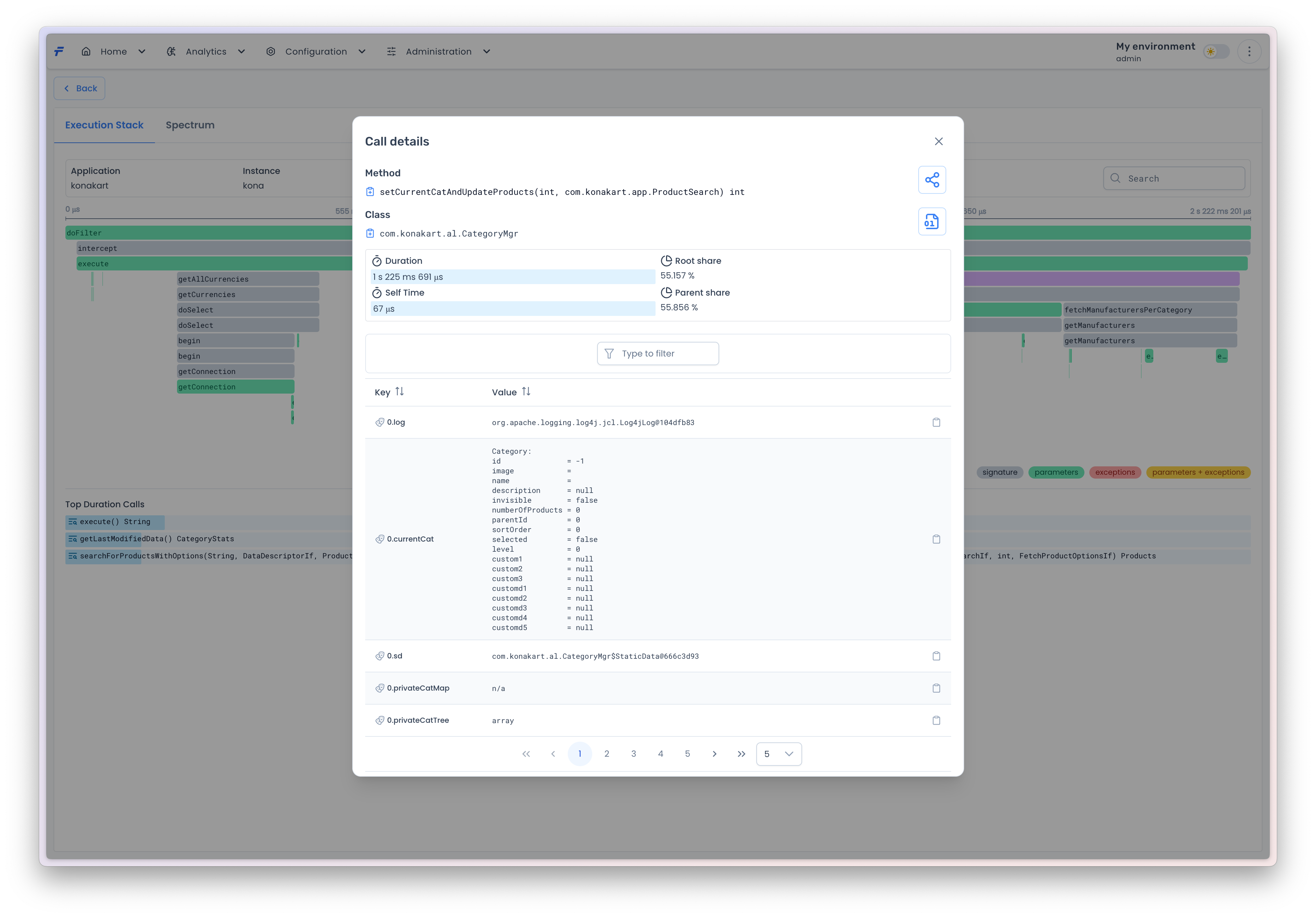
The stack is interactive, if you double-click one of the bars you will get its method invocation details in a popup window. The method is identified by its signature and a class it belongs to. There are two *copy* icons, next to both `Class` and `Method` labels. If you click the icon, the corresponding value will be copied to the profiles clipboard, which can be used in [defining instrumentation rules](/user-guide/profiles.md#inclusive-rules).
Method details popup
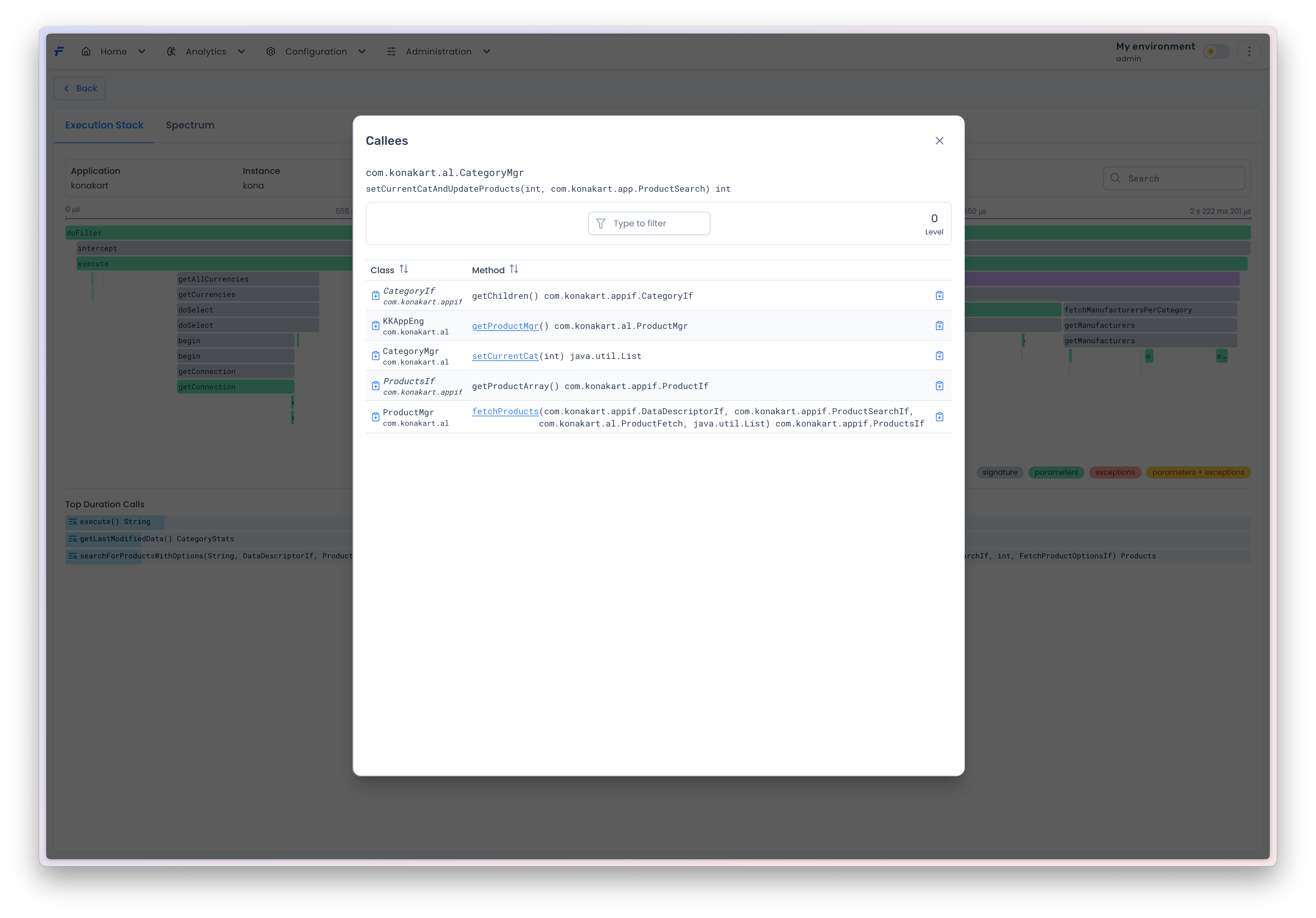
On the right-hand side, there are two buttons. The upper button allows for retrieving from the agent a list of all methods ([callees](#callees)) that are directly invoked by the selected method. The lower button enables downloading from the agent and saving locally the class bytecode.
#### Callees
The **Callees View** displays a tabular representation of methods directly invoked by the currently selected method (listed at the top of the view). The table comprises two columns: Class (name of the containing class) and Method (name of the invoked method). Method names are hyperlinked when navigable, enabling users to drill down into subsequent callee methods, thereby exploring deeper call hierarchies. The Level indicator (top-right) reflects the current nesting depth relative to the root method. A Back button (top-left) allows returning to the parent method. Italicized class names denote interfaces, rendering their associated methods non-hyperlinked (navigation disabled). Icons adjacent to class/method names enable single-click copying to a clipboard, facilitating quick addition to instrumentation profiles. This feature aids in mapping application call structures and streamlining the selection of methods for performance profiling or debugging.
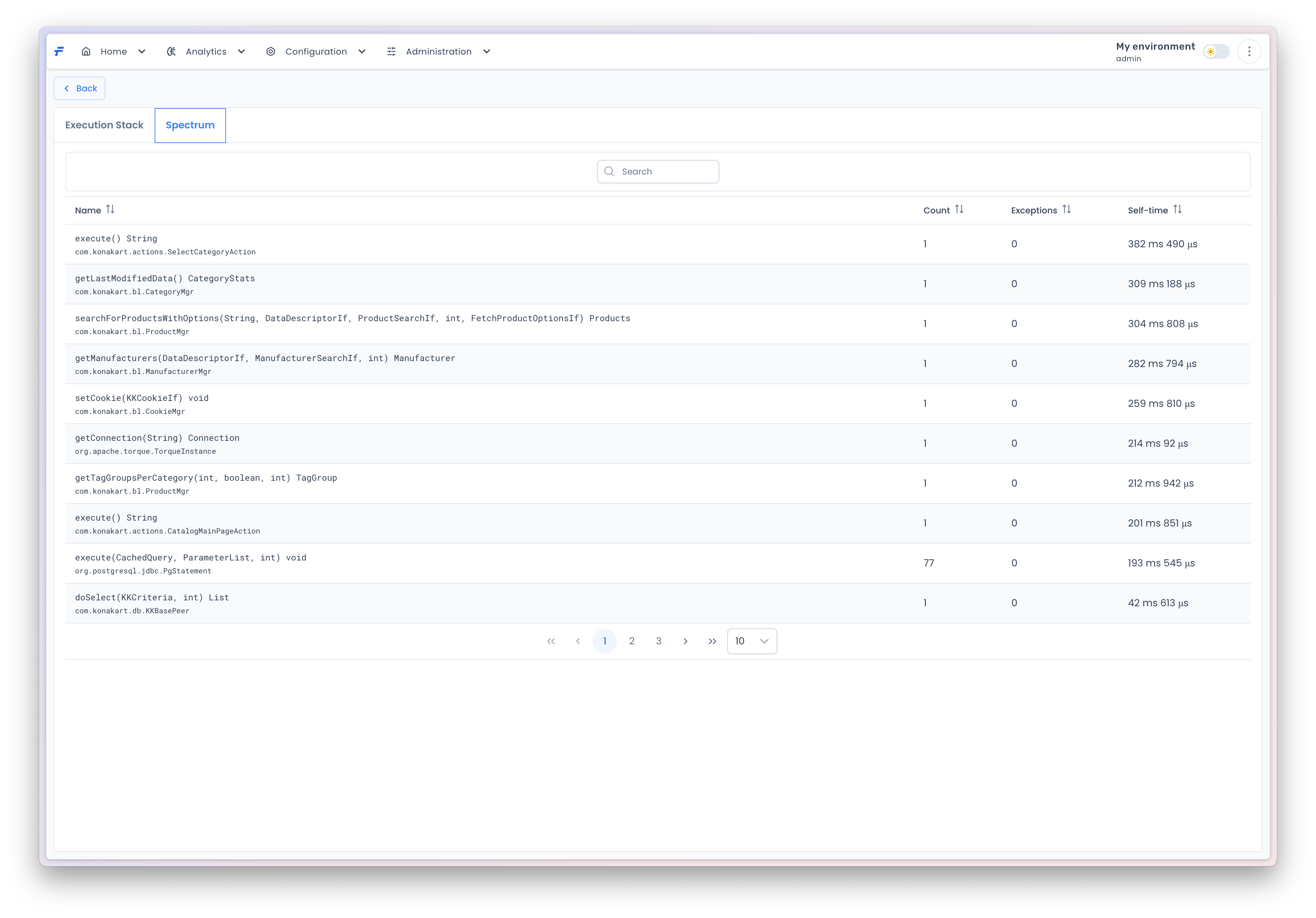
#### Spectrum
This view presents a list of all methods called within the execution stack. The methods are aggregated and sorted. You can sort them with respect to one of the three criteria: self time, calls count and exceptions count.